LEGO Missing Pieces Form Not Working? Use This Error Check
Short answer: do not keep resubmitting the same request. Save the set number, element ID, quantity and exact error first. Then separate a browser failure from a quantity warning, a declined request or a missing confirmation. Technical failures get one clean-browser retry; request decisions and unresolved submissions go to LEGO Customer Service.
This page covers a failed online submission. If you are still identifying the part, use the part identification guide. If the bag contained a different element, use the wrong-piece swap check.
Benchmark reading: LEGO.com provides the official Missing Pieces route and contact options; Music City Bricks focuses on pre-request checks; Reddit cases show form errors linked to browser and content-blocking conditions. The four-outcome triage below is BrickMend's original organization of that gap.
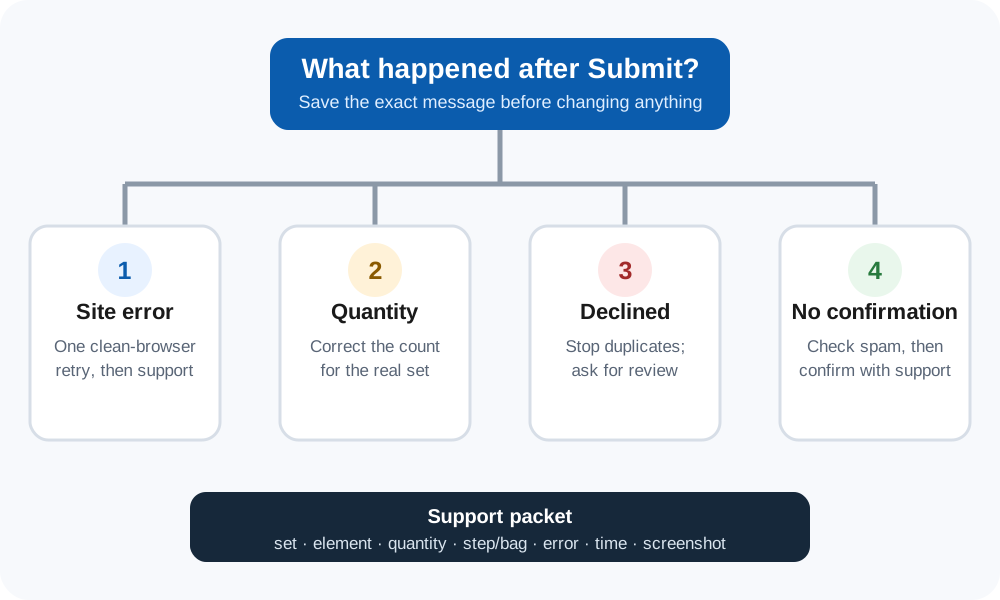
1. Capture the request before changing anything
Take a screenshot of the full message and copy the page address. Record the set number, the colour-specific element ID, the requested quantity and the time of the attempt. If a production code is visible on the box or bag, record it without posting your home address or other private details publicly.
| Outcome | What it usually means | Next move |
|---|---|---|
| Page or submit error | The site did not complete the transaction | Make one clean-browser retry |
| Quantity warning | The selected count exceeds the quantity recorded for that set | Correct the count; do not switch to an unrelated set |
| Declined request | The submission was received but not approved | Stop resubmitting and contact Customer Service |
| No confirmation | The final state is unknown | Check spam and saved evidence, then ask support to confirm |
2. Give a technical error one clean retry
- Keep the request small and exact. Use the set that actually contains the piece and do not exceed the quantity shown for that set.
- Temporarily disable content blocking for LEGO.com. A current Reddit case attributes the generic submit error to an ad blocker. Restore your normal setting after the attempt.
- Use a current mainstream browser. Open a fresh window, return through LEGO's official Missing Pieces page and enter the saved details once.
- Stop after the retry. If the same error returns, preserve the new screenshot and move to Customer Service instead of producing duplicate submissions.
3. Treat a quantity warning as data, not a site outage
LEGO's piece-selection page can display “Brick quantity limit reached” when the selected quantity is higher than the quantity associated with that set. Recheck the instruction inventory and the number missing from the build. The official Missing Pieces page also says that pieces for different sets require separate requests. Do not use another set number simply to bypass a quantity check.
4. Hand off a decline or unresolved submission
LEGO's US contact page offers a message form and region-specific phone details; chat availability can change. Send the support agent one compact packet: set number, element ID, quantity, first affected step or bag, exact error text, attempt time and screenshots. State whether the set was new and sealed, whether a bag was damaged, or whether a wrong element was packed in place of the expected one.
Do not claim that a technical error proves the request was rejected. Do not claim that a decline proves abuse. The online form does not publish a complete explanation for every outcome, so the support handoff is where the case can be reviewed.
One-minute decision check
- I saved the exact error and request details.
- I know whether this was a technical error, quantity warning, decline or missing confirmation.
- I made no more than one clean retry for a technical error.
- I used one set per request and the real quantity missing.
- I am ready to send the seven-field handoff packet if the result is still unresolved.
Checked 12 October 2026. Official availability, contact hours and form behavior can change by region.
BrickMend is an independent reference site and is not affiliated with or endorsed by the LEGO Group.