LEGO Missing Pieces: Wrong Piece in the Bag? Check This Before You Request
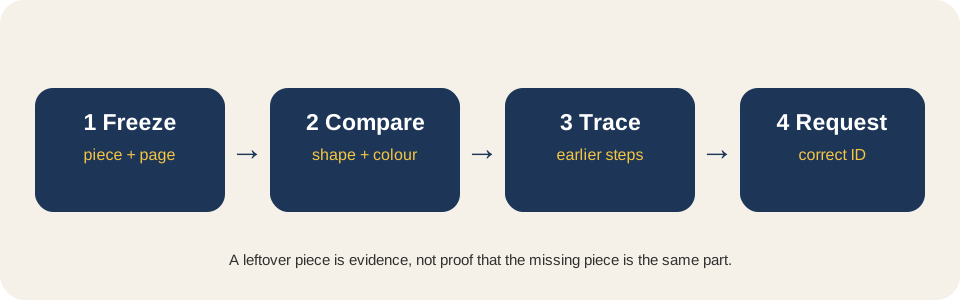
Short answer: treat a leftover piece and a missing piece as a possible swap until you check the earlier steps. Keep the suspected extra part, compare its shape and colour with the part the instructions call for, then verify the element ID before filing a replacement request.
This page covers a wrong-piece or wrong-step diagnosis. For a whole numbered packet, use the missing-bag audit; for an unknown part number, use the part identification guide.
Benchmark reading: LEGO.com provides the official search and request route; Music City Bricks describes wrong-part and earlier-step mix-ups; Reddit discussions show builders finding a substitute or wrong colour in place of the expected element. This page turns that repeated confusion into a swap check.
1. Freeze both sides of the suspected swap
Leave the model at the first step that cannot be completed. Put the leftover piece, the open bag and the instruction page on one tray. Record the set number, step number, expected quantity and the piece that is actually left over. Do not throw away the bag or use the extra part in another build while you investigate.
2. Compare the piece the instructions call for
- Read the parts box, not only the finished picture. Count the expected shape, colour and quantity beside the step.
- Check the earlier steps. Look for a similar part used where the expected piece should have been, including a colour or mirrored-side mix-up.
- Test the connection. Studs, holes, clips, axle ends and smooth faces often distinguish two pieces that look similar in the model.
- Keep the mismatch. Photograph the leftover part next to the instruction callout and keep both IDs together.
| Field | Write down | Why it matters |
|---|---|---|
| First affected step | Step and page | Shows where the build became impossible |
| Expected element | Shape, colour, quantity, element ID | Defines the requested part |
| Leftover element | Shape, colour, quantity, visible ID | Tests whether a wrong piece was packed |
| Earlier-step check | Step reviewed and result | Rules out using the right part in the wrong place |
| Bag evidence | Bag number and condition | Preserves the packing trail |
3. Choose the correct next move
If the leftover piece matches an earlier instruction callout, rebuild that step and continue. If it is a different colour or shape but the set is new, keep it as evidence and use LEGO's official Missing Pieces route after you have the expected element ID. If the piece is broken or cracked, use the official damaged-pieces route instead. If several pieces are missing and the bag trail is wrong, stop and run the bag audit rather than guessing a long list.
One-minute decision check
- I recorded the first affected step and bag.
- I compared the expected part with the leftover part.
- I checked earlier steps for a wrong colour, side or shape.
- I have the expected element ID before opening the request form.
If all four are true and the mismatch remains, submit one clear request with the set number, expected element ID, quantity and the swap evidence. Do not report the leftover piece as the missing one.
BrickMend is an independent reference site and is not affiliated with or endorsed by the LEGO Group.