How to Identify Missing LEGO Parts Without Knowing the Number
Short answer: start with the set number and the instruction step where the gap appears. Match the pictured shape and color to the parts inventory at the back of the instructions, then copy the color-specific element ID. If the inventory has no match, use the piece's molded design ID plus its color, or send LEGO the set number, step, bag, and a precise description.
This guide solves identification only. Once you know the part, use the pre-request action order before filing.
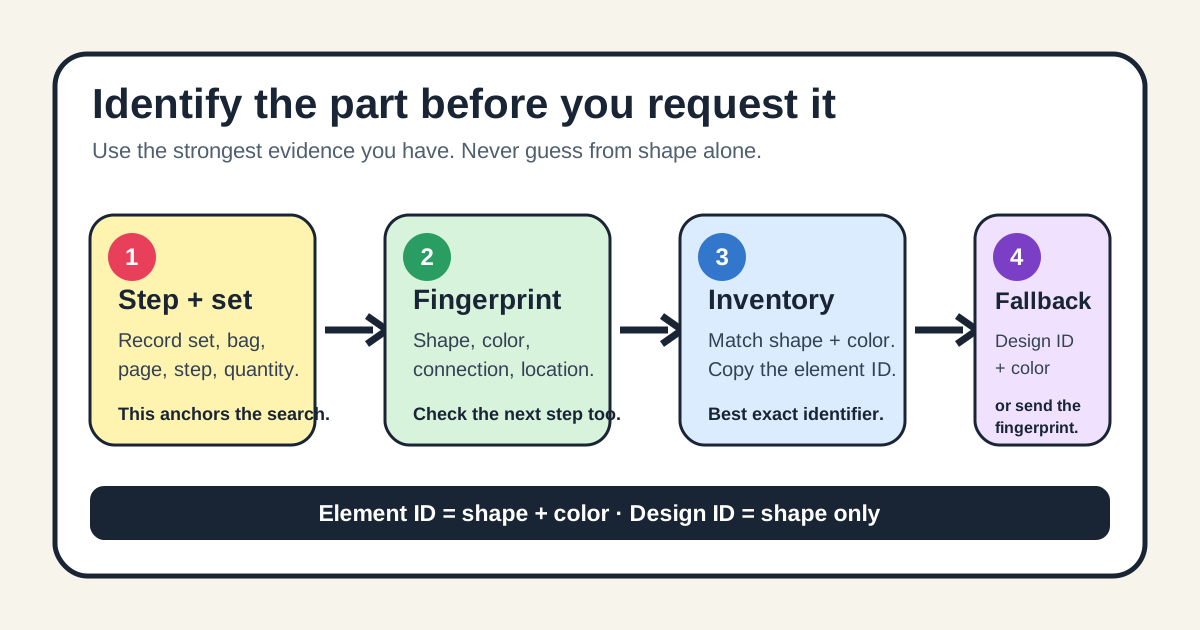
The four-anchor part fingerprint
Before searching, write four facts on one line: shape, color, connection, and location. For example: “dark bluish gray, one-stud clip, grips a horizontal bar, step 118.” This fingerprint is more reliable than a nickname such as “small gray claw,” and it gives customer support enough context to separate similar pieces.
| Anchor | What to record | Why it narrows the match |
|---|---|---|
| Shape | Plate, tile, slope, clip, hinge, axle, pin, minifigure item, or other visible form | Removes unrelated element families. |
| Color | The instruction color and the nearest confirmed piece in the same step | Separates color-specific element IDs. |
| Connection | Studs, anti-studs, bar, clip, axle hole, pin hole, or ball joint | Distinguishes look-alike parts that cannot connect the same way. |
| Location | Set number, bag number, page, and step | Ties the description to one known inventory and build context. |
1. Read the build step before the parts list
Keep the model at the first step that cannot be completed. Note the quantity bubble, the arrow direction, and every visible connection point. Compare the pictured part with a known part already used nearby. A piece that looks identical from above may have a different underside, clip direction, or axle opening.
If the instruction image is ambiguous, look one step forward. The next connection often reveals whether the missing item needs a stud, hole, clip, or smooth surface.
2. Match the set inventory and copy the element ID
Newer instruction books normally include a parts inventory near the back. Find the matching shape and color, then copy the number printed beneath that exact image. LEGO calls this the element number; it identifies the design in a specific color. A number from the right shape in the wrong color is not an exact match.
If the paper booklet is missing, search the set number in LEGO's Building Instructions library and open the official PDF. Use the inventory page rather than trying to identify the part from a product photo.
3. Know when a molded number helps
A number molded inside an existing matching piece is usually a design ID. It identifies the shape, not necessarily the color. Search it together with the color and set number. LEGO's identification help says the small four- or five-digit design number can be entered in the replacement-parts service, while the element number from the instructions is the more precise color-specific identifier.
| You have | Use | Add this check |
|---|---|---|
| Inventory image and number | Element ID | Confirm the pictured color matches the build step. |
| A matching physical piece | Molded design ID + color | Rotate it under bright light; do not copy a production mark by mistake. |
| Only the instruction step | Four-anchor fingerprint | Include set, bag, page, step, and quantity. |
| A part absent from the online set list | Official inventory evidence + description | Contact support instead of substituting a similar-looking listing. |
4. What to do when the part is not listed
- Confirm the set number from the instruction cover or box, including any suffix shown online.
- Check whether the same numbered bag appears more than once.
- Compare the official PDF inventory with the physical booklet.
- Save the step, page, bag, quantity, color, and connection details.
- Use LEGO's Missing Pieces route; if the part still does not appear, contact support with the fingerprint instead of choosing a near match.
Community cases show why this matters: builders sometimes enter a plausible number and receive the mirrored, differently colored, or otherwise wrong piece. The goal is not to produce any valid ID; it is to produce the ID that belongs to this set and this step.
A 60-second identification check
- I know the exact set number.
- I recorded the bag, page, step, and quantity.
- I matched shape, color, and connection type.
- I know whether my number is an element ID or a design ID.
- If the list has no match, I will send the fingerprint rather than guess.
If all five are true, you have enough evidence to search or ask support accurately.
Checked 29 September 2026. Sources: LEGO's set and piece number guide and Missing Pieces form; Music City Bricks' missing-pieces guide; and an r/lego identification case. BrickMend is independent and not affiliated with the LEGO Group.