LEGO Duplicate Inner Boxes? Map the Missing Bag Range
Short answer: stop opening bags, keep the duplicate inner boxes together, and map every visible box label and bag number against the instruction sequence. A repeated inner box can mean a different box or entire bag range is absent; report the missing range with the set number instead of guessing an individual-piece total.
This is for a new set whose sealed carton contains duplicate inner boxes or repeated groups of numbered bags. It is different from one missing bag: use the missing-bag audit for that case, or the wrong-piece check if one bag has a surplus and one element is absent.
Benchmark reading: LEGO.com starts a missing-piece request with the set name or number. Music City Bricks emphasizes ruling out ordinary packing and build-check errors first. A Reddit case describes duplicated inner boxes and missing bag groups. BrickMend’s box map and range-first record below are original tools for this narrow situation.
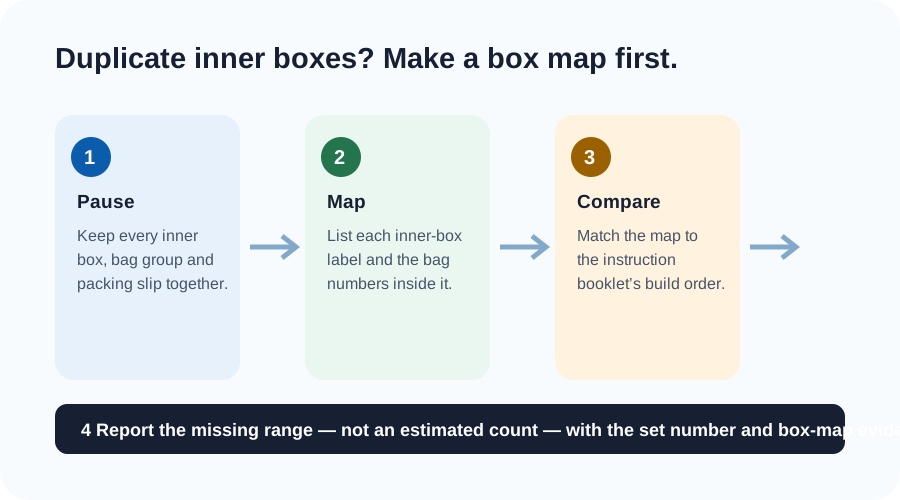
1. Preserve the packing pattern
Pause before sorting everything into piles. Put matching inner boxes side by side, keep unopened bags inside their original group where possible, and retain the outer carton and inserts. The useful fact is the repeated packaging pattern, not a claim that a particular loose element is missing.
2. Build a box map
| Field | Write down | Do not infer |
|---|---|---|
| Set identity | Exact set number and edition shown on the outer carton | That every edition has the same box layout |
| Inner-box labels | Each printed number, letter or distinguishing mark | That two plain cartons are duplicates without checking contents |
| Bag groups | Bag numbers found in each inner box or compartment | A part count from unopened bags |
| Build range | The first instruction section that cannot be supplied by the map | The replacement quantity before support reviews the case |
Photograph labels and the repeated group in one well-lit frame. Crop out delivery labels, addresses and payment information. If the boxes have no labels, describe the repeated bag-number range instead.
3. Compare in build order, not by loose parts
- Open the official digital or paper instructions for the exact set number.
- Mark the bag numbers or build sections you can account for once.
- Mark any second occurrence of the same group.
- Identify the gap between the known groups, if there is one.
A duplicate group does not automatically reveal the missing group. Some models intentionally use repeated bag numbers or similar cartons. The point of the map is to give support a reproducible starting record instead of combining unrelated missing-piece claims.
4. Use a range-first support note
| Include | Example | Why it is useful |
|---|---|---|
| Set number | Exact number from the outer carton | Links the case to one product record |
| Observed duplicate | Two inner groups each contain bags 1–4 | States what can be checked directly |
| Missing build range | Instructions next require bags 5–8, which are not present | Explains the practical impact without estimating parts |
| Evidence | One photo of both grouped labels and a bag-number list | Lets a reviewer validate the pattern |
Use LEGO’s replacement-parts route or Customer Service for a new-set defect, following the options available in your region. Ask what evidence they need and keep the packaging until you receive their direction. Do not open a separate request for each part in a range you have not yet inventoried.
One-minute duplicate-box check
- I kept the duplicate groups intact long enough to record them.
- I wrote bag numbers and labels, not a guessed part total.
- I checked whether repeated bag numbers are intentional in this set’s instructions.
- I identified a missing build range only where the map supports it.
- I kept address and payment details out of photos.
Checked 18 October 2026. Packaging layouts and support options can vary by set and region.
BrickMend is an independent reference site and is not affiliated with or endorsed by the LEGO Group.